
- Business Central
- AI implementation
Artificial intelligence is becoming part of finance and operational workflows, but approving AI automation requires more than looking at the promised reduction in manual work. Controllers need to understand where the automation operates, what information it uses, how approvals are handled, and whether the resulting activity can be reviewed later.
For organizations using Microsoft Dynamics 365 Business Central, these questions become especially important because the ERP remains the financial and operational system of record. Codenetix approaches AI implementation on Business Central by keeping workflows on the ERP and grounding assistants in Business Central data, with an audit trail designed for controller review.
Start With the Existing ERP Process
Before approving an AI project, a controller should first understand the process that the technology is expected to change.
Codenetix's approach begins with the operating model before configuration. Close, inventory, order-to-cash, and controls are defined before Business Central ERP is configured around those requirements. This establishes how the financial process should operate before automation is introduced.
That sequence matters.
If a manual process is poorly defined, automating it does not automatically solve the underlying control issue. The first question should therefore be what the existing process is, which steps require human review, and which activities are suitable for automation.
Once those responsibilities are clear, AI can be introduced around a defined ERP workflow.
Know Where the AI Operates
A controller should also know whether an AI assistant is working directly with the ERP or creating a separate process outside it.
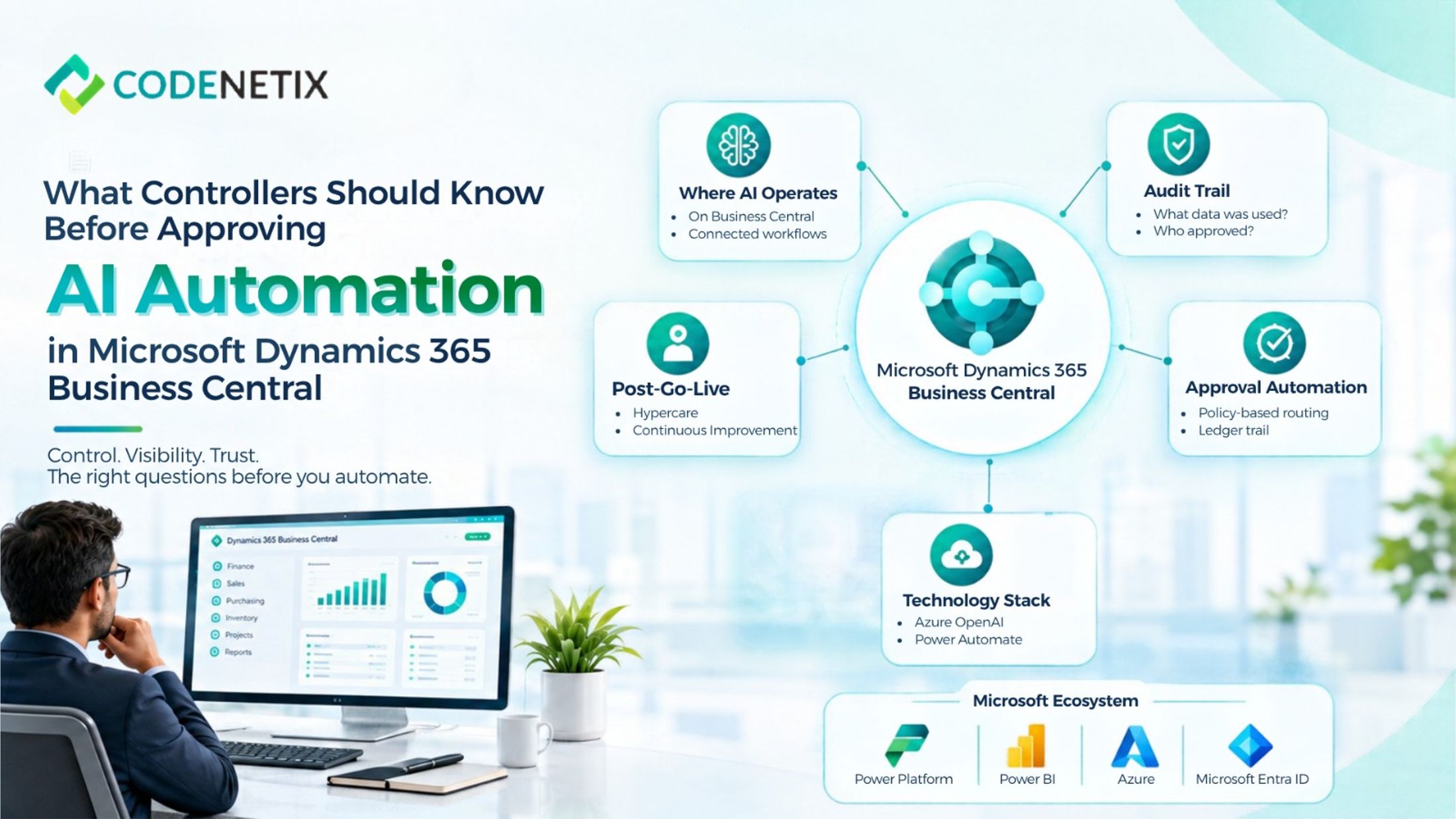
Codenetix specifically states that its AI implementation and automation work is performed on Business Central. Document, approval, and reconciliation workflows remain on the ERP, while assistants are grounded in Business Central data and the close calendar.
This is different from placing an AI tool beside the ERP and asking employees to move information between systems.
For a Microsoft Dynamics 365 Business Central environment, keeping the workflow connected to the system of record can make the relationship between proposed activity, approval, and posted transaction easier to follow.
Review the Audit Trail.
Auditability should be one of the first considerations before approving AI automation.
Codenetix describes an audit trail that a controller can accept, including policy-based approval routing with a complete trail on the ledger. Its AI approach also keeps document and reconciliation workflows on the ERP.
For controllers, the practical questions are straightforward:
- What information did the workflow use?
- What did the assistant propose?
- Who reviewed or approved the activity?
- What was eventually posted?
- Can the sequence be reviewed later?
These questions should be answered before automation moves into a live financial process.
Understand Approval Automation
Approvals are an important area for AI automation because they combine repetitive activity with financial controls.
Codenetix identifies approval workflows as one of its core AI implementation capabilities. Policy-based routing can move approvals into an ERP workflow while retaining a complete trail on the ledger. The company also identifies moving email approvals onto an ERP workflow as a common first release.
For a controller, this means the objective is not simply to approve requests faster.
The workflow needs to reflect the organization's existing policies and maintain evidence of the process. When approval activity remains connected to Business Central, finance can work from the same environment as the underlying transaction.
Check How Documents Are Handled
Document processing is another area where AI automation can affect finance.
Codenetix describes document intelligence for invoices, packing documents, and contracts, with information moving into posted ERP activity.
Before approving such automation, controllers should understand how documents are captured, what information is extracted, where that information goes, and what review happens before posting.
This is particularly relevant to an ERP system implementation process, because document workflows need to fit the wider configuration rather than becoming an isolated automation project.
Understand the Technology Behind the Workflow
AI automation in Business Central can involve several Microsoft technologies. Codenetix lists Azure OpenAI, Microsoft Copilot, Power Automate, Business Central APIs, and Microsoft Power Platform within its AI technology stack.
This makes it useful for controllers to understand the architecture without needing to become technical specialists.
For example, Power Automate in Business Central can form part of workflow automation, while Business Central APIs can connect processes to the ERP. Power BI and Business Central can support reporting and analytics where broader management visibility is required. Codenetix also lists Power BI and Power Platform as technologies used within its Business Central programs.
Plan for Change After Go-Live
AI automation should not be treated as finished on the day the ERP goes live.
Codenetix includes hypercare within its Business Central program and describes standing change capacity for Business Central and AI after the first release.
For organizations purchasing ERP implementation services, post-go-live support should therefore be considered part of the wider program rather than an afterthought.
A Controller's Approval Should Start With Control
AI automation can reduce repetitive work, but the financial case is only one part of the decision.
For Microsoft Dynamics 365 Business Central, controllers should look at the operating model, data source, approval structure, audit trail, reconciliation process, technology architecture, measurement criteria, and post-go-live support before approving an AI workflow.